Event
Event Triggers subscribe to a single event source. When the source produces an event (e.g., MQTT topic, OPC UA tag, or instance), the event enters the pipeline. If the source is invalid or does not generate events, the trigger goes into an error state.
The Event Trigger uses a Reference as its source. Path-based indexing is not supported. References must be static and cannot be dynamically driven by values or parameters. For more information, see References .
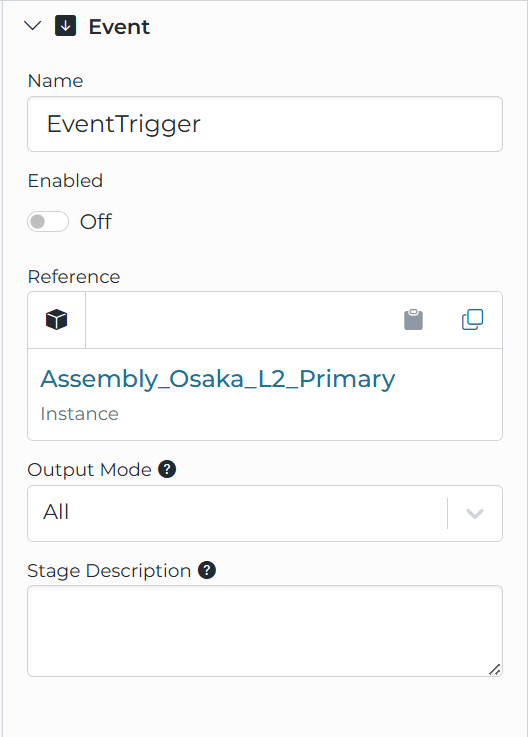
Configuration
Reference
A reference to the source of the events. For example, this could be an MQTT input or an OPC UA tag. When the trigger references a template input, the event metadata includes a parameters object that defines all parameters associated with the source.
Output Mode
Controls what data is received from the source and passed into the pipeline. This setting applies to OPC UA Branch inputs, OPC UA Collection inputs, Sparkplug B inputs, and Instances.
All
Outputs the complete payload with each update. This is the default mode.
- OPC UA Branches and Collections — Outputs the full cached state, including all tags with their last known values
- Sparkplug B Inputs — Outputs all metrics that have been seen, with their last known values
- Instances — Outputs all generated attributes
Example:
Initial event:
{
  "temperature": 75,
  "pressure": 100,
  "status": "running"
}
Next event (only temperature changed):
{
  "temperature": 76,
  "pressure": 100,
  "status": "running"
}
Changed
Outputs only the data that changed or was included in the current update. This reduces bandwidth and simplifies downstream processing.
- OPC UA Branches — Outputs only the tags that updated since the last batching window
- OPC UA Collections — Outputs only the tags that updated since the last batching window
- Sparkplug B Inputs — Outputs only the metrics included in the incoming message update. Only applies to inputs configured with the DATA Message Type.
- Instances — Outputs only the attributes that have changed. The instance is still built using the full cached state from all inputs to ensure consistent evaluation.
Example:
Initial event:
{
  "temperature": 75,
  "pressure": 100,
  "status": "running"
}
Next event (only temperature changed):
{
  "temperature": 76
}
Event Values
Value
{
  "attr1": "value of the event",
  "attr2": 2
}
Metadata
{
  "source": "Connection.internalBroker.pump({\"id\":\"3\"})",
  "parameters": {
    "id": "3"
  },
	"triggerType": ".TriggerEvent",
  "triggerName": "EventTrigger"
}
You can access a parameter in pipeline expressions using event.metadata.parameters.<parameterName> (for example, event.metadata.parameters.id).
Subscribable Sources
The following sources can be referenced by the Event Trigger:
Inputs
Individual inputs configured on connections can be subscribed to directly. The subscription behavior depends on the connection protocol and input type:
- OPC UA Tags — Subscribe to individual tag value changes ( OPC UA TCP )
- OPC UA Events — Subscribe to OPC UA event notifications ( OPC UA TCP )
- OPC UA Branches — Subscribe to any tag change within the branch structure ( OPC UA TCP )
- OPC UA Collections — Subscribe to any tag change within the collection ( OPC UA TCP )
- MQTT Topics — Subscribe to messages on the topic ( MQTT )
- Sparkplug B Inputs — Subscribe to DATA, CMD, or RAW messages for the specified Group/Edge/Device ( Sparkplug )
- Azure IoT Hub Inputs — Subscribe to device messages ( Microsoft Azure IoT Hub )
- Azure Event Hub Inputs — Subscribe to event streams ( Microsoft Azure Event Hubs )
- Webhook Inputs — Subscribe to incoming HTTP requests ( Webhook )
- Ignition Path Inputs — Subscribe to tag value changes ( Ignition Module )
- Ignition UDT Inputs — Subscribe to UDT value changes ( Ignition Module )
Instances
When an instance references one or more subscribable sources, you can subscribe to the instance directly. For detailed information on how instance subscriptions work, see Instance Subscriptions .
Subscription Behavior
Connection Recovery
Subscriptions automatically recover when connections are restored after a disconnect:
- When a connection goes offline, subscriptions enter a waiting state
- When the connection is re-established, subscriptions are automatically recreated
- No manual intervention is required
Configuration Changes
If a subscribed source’s configuration changes, the subscription is automatically recreated with the new settings. This applies to:
- Connection or Input setting modifications
- Instance attribute changes
- Namespace node modifications